Features
Every feature, by edition
The Community edition is free, with no limits on hosts, nodes or users, and everything marked Community stays free. Paid editions add features for teams, compliance and scale. A license only controls setting up or changing a paid feature: nothing on the request path ever checks it.
"Homelab and up" means Homelab, Business, Enterprise and MSP; "Business and up" means Business, Enterprise and MSP. MSP includes everything in Business plus its own features. Compare editions in one table.
Proxy and certificates
Everything Caddy serves, configured from one place.
-
Proxy hosts
Several upstreams per host, eight load-balancing policies, active and passive health checks, retries, custom headers and an on/off switch. Documentation
-
Location rules, redirects and rewrites
Path-based routing to other upstreams (for example
/api/*to one backend), redirect rules (301, 302, 307, 308) and path prefix rewrites. Documentation -
L4 TCP and UDP proxying
Stream proxying with TLS SNI matching, the PROXY protocol (v1 and v2), load balancing, health checks and geo blocking. A sidecar manages the Docker Compose ports.
-
Automatic HTTPS
Certificates from Let's Encrypt or your own ACME directory for every host, DNS-01 through 22 DNS providers with credentials encrypted at rest, and imported certificates with expiry monitoring. Documentation
-
Internal CA and mTLS
Issue and revoke client certificates from a built-in CA, require them per host, and give certificate roles access to chosen paths. Documentation
-
Default response and DNS controls
What unknown hosts and direct-IP requests get, custom resolvers per host and upstream DNS pinning.
-
Host tags
Free-form tags on proxy and L4 hosts, shown in the lists and matched by their search; a custom role can be limited to hosts with one of its tags. Documentation
Security
What stands in front of each host, and what it stopped.
-
Web application firewall
Coraza with the OWASP Core Rule Set 4.25: paranoia levels, anomaly thresholds, detection only or blocking per host, rule exclusions scoped to a host, path or variable, and custom SecLang rules. Documentation
-
Security events
What the WAF, geo rules, access lists, sign-in and rate limits stopped, with the reason, the top rules and sources, and one-click blocking of an address. Documentation
-
Access lists and geo blocking
Ordered allow and deny rules by address, CIDR range, country, continent or AS number, HTTP basic auth, and a global list of blocked sources with expiring entries. Documentation
-
Rate limiting
Per host and global, by path and method, counted per client address, request header or signed-in user, answering 429 with Retry-After. Documentation
Sign-in and identity
Who may use the dashboard, and who may reach your apps.
-
Forward auth portal
A built-in sign-in page in front of any proxy host, with access by user or group and paths that skip it; or an external forward-auth server: Authentik, Authelia or another. Documentation
-
OpenID Connect sign-in
Dashboard sign-in through any OIDC provider (Authentik, Keycloak, Auth0 and others), with account linking. Documentation
-
Multi-factor authentication and passkeys
Authenticator apps, backup codes and passkeys for dashboard sign-in, and a policy that requires them. Documentation
-
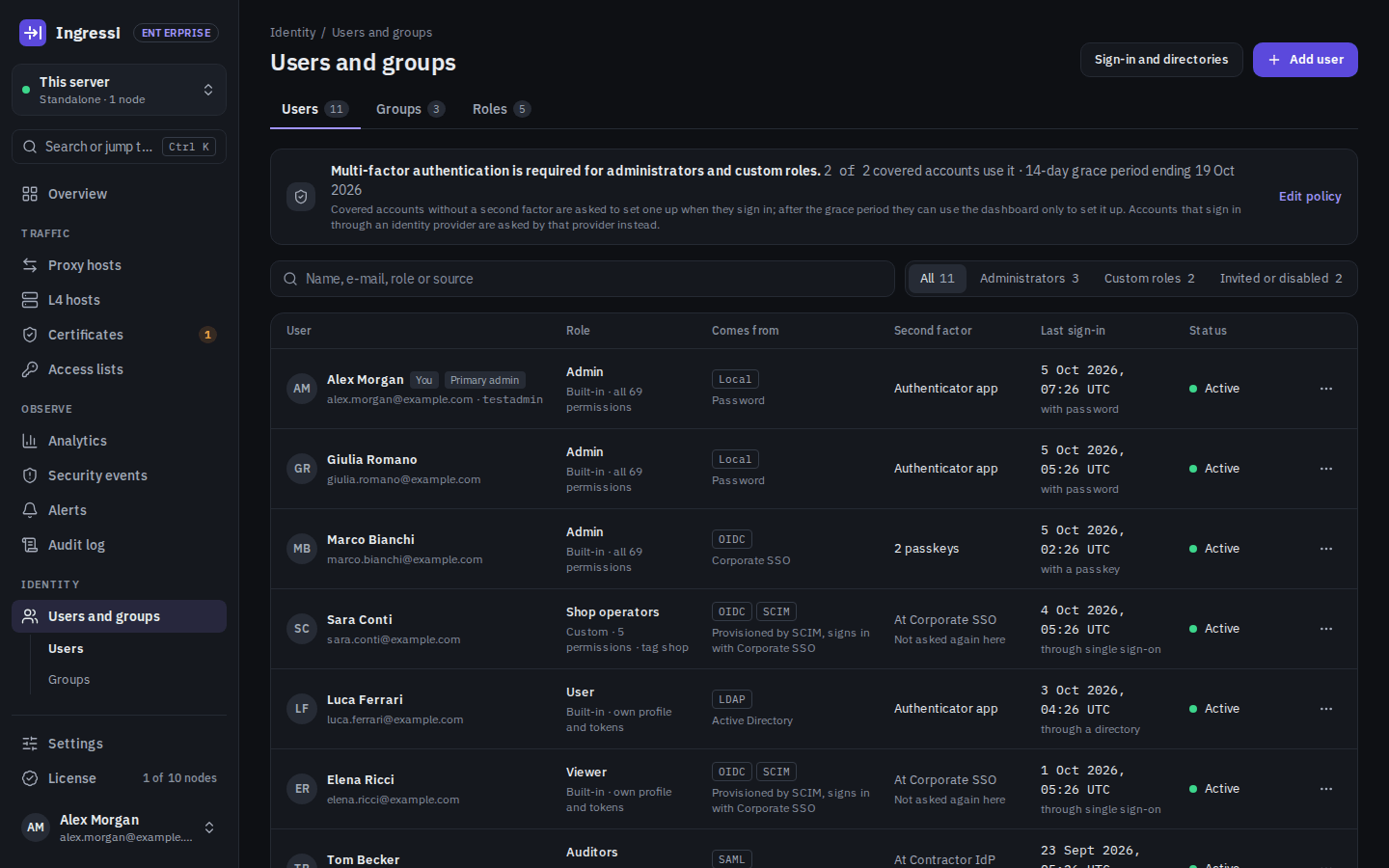
Users, groups and built-in roles
Viewer, user and admin, groups for forward-auth access, and a view of how each account signs in and when it last did. Documentation
-
SAML single sign-on
Sign in to the dashboard through a SAML 2.0 identity provider, with group-to-role mapping. Documentation
-
Enforced SSO
Turn off password sign-in for everyone except named break-glass accounts. Documentation
-
LDAP / Active Directory
Dashboard sign-in with LDAP or Active Directory accounts, with group-to-role mapping. Documentation
-
SCIM provisioning
Create, update and disable users and groups from your identity provider (Microsoft Entra ID, Okta and other SCIM 2.0 clients). Documentation
Roles, audit and change control
Who changed what, and who may.
-
Audit log
Every change, sign-in and check, linked into a tamper-evident hash chain, with the before and after of each change. Documentation
-
Configuration export and import
Hosts, access lists, certificates and settings in one file, with every secret encrypted by a passphrase, to load on the same or another install. Users, sessions, API tokens, the audit log and the license stay out of it. Documentation
-
Custom roles
Roles with fine-grained permissions, scoped to tagged hosts so teams can share one install. Documentation
-
Audit streaming and export
Stream the audit log to a SIEM (syslog, webhook, Splunk HEC), export it, set retention and verify its hash chain. Documentation
-
Configuration history and rollback
A snapshot of the configuration on every change, with diffs and one-click rollback. Documentation
-
Scheduled backups
Encrypted configuration backups to your own S3-compatible storage on a schedule. The secrets in them are encrypted with a passphrase; host names and settings stay readable, so keep the bucket private. Documentation
-
Change approvals
Four-eyes approval for changes to protected hosts, and change windows. Documentation
Analytics and alerts
What happened, and who needs to know.
-
Traffic analytics
Every request in ClickHouse for 30 days by default, nothing sampled: outcomes, countries and networks, top lists, a request log, CSV export and saved views. Documentation
-
Overview and needs attention
The first page after sign-in: what needs attention, most severe first, traffic, the busiest hosts, the nodes and the latest changes. Documentation
-
Certificate expiry e-mails
An e-mail before a certificate expires, without a license. Documentation
-
Prometheus metrics
Caddy's metrics for your own monitoring.
-
Alerting
Alerts for certificates, upstreams, WAF spikes and sync failures to e-mail, Slack, Teams, PagerDuty, ntfy or a webhook. Documentation
-
AI analyst
Plain-language alert explanations, a daily security digest and WAF tuning suggestions, using your own model. It also answers questions about your traffic asked in plain language on the Analytics page, with the numbers, a chart or a table and the query the question was read as. Documentation · Analytics questions
Compliance
Evidence for audits, from what Ingressi already records.
-
Compliance reports
Access reviews, change logs, certificate inventory and WAF/MFA coverage mapped to NIS2 and ISO 27001, and NIS2 incident notification drafts. Documentation
-
Access reviews
Periodic access recertification: reviewers keep or revoke each user's roles, groups and API tokens, with a downloadable record. Documentation
Fleet and scale
More than one node.
-
Instance sync
A master pushes proxy hosts, certificates, access lists and settings to its replicas on every change, with secrets sealed to each replica's own key. Documentation
-
PostgreSQL
Keep the dashboard's data in PostgreSQL 16 or later instead of SQLite: your own server, or the one the bundled compose file runs next to the stack. A copy tool moves an existing install from SQLite and compares every table before it commits. Documentation
-
Fleet management
Manage many nodes: environments, promotion, drift detection and canary rollout. Documentation
-
High availability
Shared certificate storage for Caddy nodes (Redis or Valkey): each certificate is ordered once and every node serves it. A dashboard cluster: one leader and warm standbys, SQLite streamed to object storage with Litestream, automatic failover. Shared state: forward-auth sessions and API balances in the same Redis or Valkey, so every web node serves them alike. PostgreSQL replicas: several dashboard containers on one PostgreSQL database, each serving every request, one running the background jobs. Documentation
-
Air-gapped installs
Offline install bundle for hosts without Internet access. Long-term-support releases are planned, not announced yet. Documentation
Service providers
One install, many clients.
-
Multi-tenancy
Isolated organizations with their own admins, hosts and usage reports. Documentation
-
White-label
Your own product name, logos, favicon, colours, sign-in texts and e-mail sender name, for your clients to see. Documentation
API and integrations
Automate everything the dashboard does.
-
REST API
Every resource under
/api/v1with Bearer tokens, which can be limited to chosen permissions, and interactive OpenAPI 3.1 docs at/api-docs. Documentation -
Command palette
Ctrl+K searches hosts, certificates, users, pages, settings and documentation, and runs common actions. Documentation
-
API monetization
Charge your API's consumers per request through your Stripe account, enforced at the edge: prepaid, postpaid with a hard cap, or x402 through Stripe machine payments. Prepaid consumers top up a balance; postpaid ones pay afterwards with a saved card; x402 takes USDC on Base, paid to your Stripe account (a Stripe preview). Documentation
On the roadmap
Planned, not shipped. We do not sell what is not built.
Upgrades without stopping every replica
The next phase of high availability: today, upgrading dashboard replicas on PostgreSQL stops every replica first. Next phases
Virtual patching
Coming soon. WAF rules for newly published CVEs from a signed feed, fetched daily or imported offline, each in detection or blocking mode. New patches will start in detection unless you choose to block new critical ones automatically, and a feed that fails its signature or any other check will be refused whole. How it will work
Long-term-support release lines
The policy is drafted: one release a year becomes an LTS line with 24 months of security and critical fixes. The first LTS line has not been announced yet. LTS policy
Missing something? Open an issue on GitHub.